
Quick Verdict
Trademetria is the best free trading journal in 2026, scoring 6.3/10 in our testing across 8 categories. Its free plan (30 orders/month), mobile-responsive web interface, and AI Coach make it the most accessible entry point in the market, though it lacks the backtesting, trade replay, and analytics depth of higher-ranked platforms like TradeZella (9.4/10) and TraderSync (7.8/10).
The platform's strengths are its free plan (30 orders/month), mobile-responsive web interface, PnL simulator, and white-label tools for trading communities. Its weaknesses are the absence of backtesting, trade replay, and the depth of analytics that more comprehensive platforms provide.
Best for: Budget-conscious traders, mobile-first users, and trading community managers
Price range: Free to $39.95/month
Verdict: A good starter journal with mobile web access and a free plan. Traders who outgrow the basics will eventually need a more comprehensive platform.
| Quick Stats | |
|---|---|
| TJ Score | 6.3/10 |
| Trustpilot Rating | 4.0/5 |
| Starting Price | Free (30 orders/month) |
| Broker Integrations | 140+ |
| Mobile App | No (mobile-responsive web) |
| Assets Supported | Stocks, Options, Futures, Forex, Crypto, CFDs |
| Founded | 2016 |
| Users | 80,000+ |
TJ Score Breakdown: 6.3/10
Trademetria's TJ Score is the average of 8 independently evaluated categories, each scored 1–10. See our full methodology.
| Category | Score |
|---|---|
| Broker Support | 8.0 |
| Reporting & Analytics | 6.5 |
| Journaling Tools | 6.0 |
| Usability & Design | 7.0 |
| Advanced Features | 4.5 |
| Pricing & Value | 8.5 |
| Community & Trust | 5.5 |
| Support & Documentation | 4.5 |
| Overall TJ Score | 6.3/10 |
See our analysis of 1,201 Trustpilot reviews across 5 trading journals, including complaint categories, praise themes, and company response rates compared.
What Is Trademetria?
Trademetria was founded in 2016 by Thiago Ghilardi and has grown to serve 80,000+ users. The platform takes an accessible, community-focused approach, offering a free tier that lets traders start journaling without financial commitment, paired with a mobile-responsive web interface for on-the-go trade logging.
Trademetria differentiates itself through gamification (trading challenges and achievements), AI-powered coaching on the Pro plan, and white-label tools that let trading educators create branded dashboards for their communities. It supports the widest range of asset classes in the journal space, stocks, options, futures, forex, crypto, and CFDs.
Key Features
Free Plan (30 Orders/Month)
Trademetria's free tier allows up to 30 orders per month with basic import and standard analytics. For casual traders or those evaluating journal platforms, it's a no-commitment way to start. The free plan includes access to basic reports and mobile web access.
Mobile Web Access
Trademetria's web platform is mobile-responsive, allowing you to log trades, review analytics, and track performance from your phone's browser. For traders who want to journal on the go, this provides basic mobile access, though it's not a native app experience.
The mobile web interface covers the core journaling workflow: manual trade entry, basic performance dashboards, P&L tracking, and calendar views. You can add notes and tags to trades, view your daily and weekly summaries, and check cumulative performance charts. Your data syncs across devices since it's all the same web account.
Where mobile access falls short is on the analytics side. The full reporting suite, detailed filtering, and PnL simulator are either simplified or difficult to navigate on smaller screens. If you want to do a deep review of your setups with multi-filter breakdowns, you'll need to sit down at a desktop. Mobile web access is better suited for quick logging and casual check-ins than comprehensive analysis.
TraderSync is the only major trading journal with native iOS and Android apps, offering trade tagging, journal notes with screenshots, and granular filtering on mobile. Trademetria's mobile-responsive web interface is a step behind a dedicated native app, but Trademetria's free plan includes mobile web access, while TraderSync requires a paid subscription ($29.95/month minimum) for any access at all.
AI Coach (Pro Plan)
The Pro plan ($39.95/month) includes an AI Coach that analyzes your trading patterns and provides personalized recommendations. It identifies tendencies in your trading behavior, like overtrading during specific sessions, holding losers too long, or inconsistent position sizing, and suggests adjustments based on your historical data.
The AI Coach works by scanning your trade history and flagging patterns that correlate with positive or negative outcomes. For example, it might notice that your win rate drops significantly on trades entered during the first 15 minutes of the session, or that your average loss is disproportionately large on Friday trades. These insights are presented as actionable suggestions rather than raw data.
The system is automated rather than conversational. You receive a set of insights and recommendations based on your data, but you can't ask follow-up questions or drill into specific scenarios the way you can with TraderSync's Cypher AI, which uses a chat interface for back-and-forth coaching. TradeZella's 50+ analytics reports takes a different approach entirely, it doesn't operate as a "coach" persona but instead powers 50+ analytical reports that surface patterns automatically across multiple dimensions.
For traders who have never used any AI-powered analytics, Trademetria's AI Coach offers a useful starting point. It can surface blind spots you might miss when manually reviewing your journal. But traders who want deeper, more interactive AI analysis will find more substance in competing platforms, and those platforms include AI features on their standard paid plans rather than gating them behind a premium tier.
Gamification & Challenges
Trademetria incorporates gamification, trading challenges, achievements, and community competitions, to keep traders engaged and accountable. This is a unique approach in the journal space and appeals to traders who are motivated by competition and milestones.
The challenges system lets traders set goals around specific metrics, consecutive green days, maximum drawdown limits, win rate targets, and track progress against those goals. Community competitions add a social layer, allowing traders to compete on performance metrics over a defined period. Achievements unlock as you hit journaling milestones (number of trades logged, streaks of consistent journaling, etc.).
The idea behind gamification is that journaling consistently is the hardest part of trade journaling. Most traders start with good intentions and then abandon the habit within a few weeks. By attaching rewards and social accountability to the process, Trademetria aims to solve the consistency problem that plagues every journaling platform.
Whether gamification works for you depends entirely on your personality and trading style. Some traders find it motivating, especially newer traders who benefit from external accountability structures. Others, particularly experienced or professional traders, may find it distracting or even counterproductive. Trading challenges that emphasize win rates or green-day streaks can inadvertently encourage bad habits, like cutting winners short to "lock in" a green day or avoiding valid setups to protect a streak.
No other major trading journal offers a comparable gamification system. TradeZella, TraderSync, Edgewonk, and Tradervue focus purely on analytics and trade review without any competitive or achievement elements. Trademetria deserves credit for trying something different in a space where most products feel functionally similar.
PnL Simulator
A unique feature that lets you simulate different position sizes and scenarios against your historical trades to see how changes would have affected your P&L. Want to know what your results would look like if you'd used 2x position size on your winning setups? The PnL simulator shows you.
This is different from true backtesting (which lets you test strategies against historical market data). The PnL simulator works with trades you've already taken, while backtesting tests hypothetical strategies on historical charts. For full backtesting capability, platforms like TradeZella offer unlimited sessions with 11+ years of data.
White-Label Admin Dashboards
Trademetria offers white-label tools for trading educators and community managers to create branded admin dashboards. This lets coaches monitor their students' performance under their own brand, useful for trading educators building a business around their mentorship.
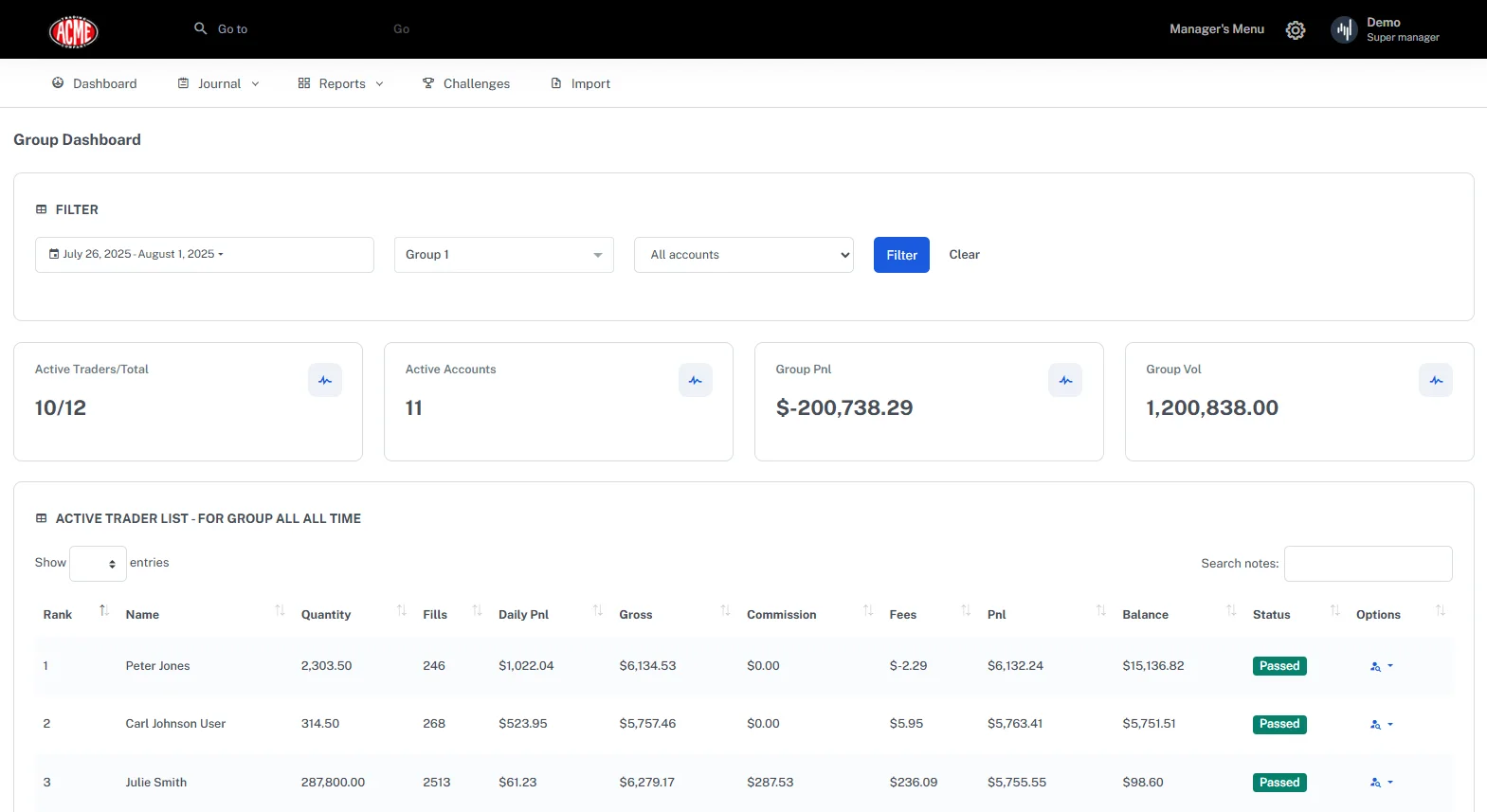
The white-label system allows educators to set up a monitoring portal with their own branding (logo, colors, custom domain) where students log trades using Trademetria's infrastructure but see the educator's brand. The admin dashboard gives coaches an overview of all student accounts, aggregate performance metrics, individual trade logs, and progress tracking. Educators can identify struggling students, highlight top performers, and run group challenges through the gamification system.
This model is particularly appealing for trading educators who want to build their brand identity. Rather than telling students "go sign up for Trademetria," the educator can offer a branded journaling tool as part of their course or community membership. It becomes a value-add for the educator's business rather than a redirect to a third-party product.
The trade-off is depth of mentorship tools. White-label branding is great for presentation, but the actual coaching features are limited to viewing student data from an admin perspective. TradeZella's Spaces (Mentor Mode) takes the opposite approach, no white-labeling, but mentors get trade-level feedback tools, full read access to every student's account, the ability to comment on individual trades, and unlimited student seats included on the Premium plan. If your priority is brand control, Trademetria wins. If your priority is hands-on coaching functionality, TradeZella's approach provides more practical tools for actually improving your students' trading.
Pricing
Trademetria offers four tiers: Free, Basic, Premium, and Pro. Here's the full breakdown.
Free to $0/month
30 orders per month, basic import (CSV and manual entry), standard reports and analytics, mobile web access, and calendar view. The free plan is genuinely functional for low-volume traders, someone placing a handful of swing trades per month can journal comfortably without paying anything.
Basic: $19.95/month
Unlimited orders, all import methods (including broker auto-sync), full analytics suite, advanced filtering, tagging, and the PnL simulator. This is the tier where Trademetria becomes usable for active traders who place more than a few trades per week.
Premium: $29.95/month
Everything in Basic, plus advanced reporting, priority support, and enhanced analytics features. The Premium tier bridges the gap between casual and professional usage.
Pro: $39.95/month
AI Coach, advanced analytics, white-label admin dashboards, all Premium features, and priority support. This is the top tier and the only plan with AI-powered coaching and educator tools.
| Feature | Free | Basic ($19.95) | Premium ($29.95) | Pro ($39.95) |
|---|---|---|---|---|
| Orders/Month | 30 | Unlimited | Unlimited | Unlimited |
| Mobile Web Access | Yes | Yes | Yes | Yes |
| Broker Auto-Sync | No | Yes | Yes | Yes |
| PnL Simulator | No | Yes | Yes | Yes |
| Advanced Reports | No | No | Yes | Yes |
| AI Coach | No | No | No | Yes |
| White-Label Tools | No | No | No | Yes |
| Gamification | Basic | Full | Full | Full |
At paid tiers, Trademetria faces a value challenge that becomes harder to ignore as you move up the pricing ladder. TradeZella Basic at $29/mo includes 50+ reports, backtesting with 11+ years of data, trade replay in 3 modes, 25+ strategy templates, Zella University, and Spaces for mentorship. Trademetria's Premium at $29.95/mo offers unlimited logging, analytics, and the PnL simulator, but no backtesting, no replay, no templates, and no education platform.
The free tier is where Trademetria's pricing genuinely shines. No other major trading journal offers a functional free plan. TradeZella starts at $29/month, TraderSync at $29.95/month, and Edgewonk at $197/year. If you're a beginner testing whether journaling is worth the effort, or a swing trader placing fewer than 30 orders per month, Trademetria's free plan is the lowest-friction entry point in the market.
Pros and Cons
Pros:
- Free plan with 30 orders/month
- Mobile-responsive web interface
- 140+ broker integrations
- Supports 6 asset classes including CFDs
- Gamification keeps traders engaged
- PnL Simulator for scenario analysis
- White-label tools for educators
- 4.0/5 Trustpilot rating from 5 reviews (zero negative). Too few reviews for meaningful complaint analysis, but all reviewers praised the dashboard and competitive pricing.
- AI Coach on Pro plan
Cons:
- No backtesting
- No trade replay
- No strategy templates
- Limited depth of analytics compared to TradeZella (50+ reports)
- AI Coach is less sophisticated than TraderSync's Cypher AI or TradeZella's 50+ analytics reports
- No built-in education platform
- Gamification may not appeal to serious/professional traders
Broker Integrations
Trademetria supports 140+ broker integrations, covering all major retail platforms across equities, options, futures, forex, and crypto. The integration list includes well-known brokers like TD Ameritrade (now Schwab), Interactive Brokers, Robinhood, Webull, Tastytrade, E*TRADE, TradeStation, NinjaTrader, and dozens of forex and crypto exchanges.
Import methods include direct broker sync (available on paid plans), CSV file upload, and manual trade entry. The free plan is limited to CSV and manual entry, which means free users need to export their trade data from their broker and upload it manually, an extra step that adds friction to the journaling workflow.
On paid plans, broker auto-sync pulls trades automatically, eliminating the manual import process. The sync works reliably for most major brokers, though some users report occasional delays or formatting issues with less common platforms. Trademetria's team has been responsive to adding new broker integrations when requested by users.
For context, TradeZella supports 500+ broker connections with auto-sync on all paid plans, and TraderSync leads the space with 950+ integrations. Trademetria's 140+ connections cover most common retail brokers, but if you use a niche or region-specific broker, it's worth checking compatibility before committing.
User Experience & Interface
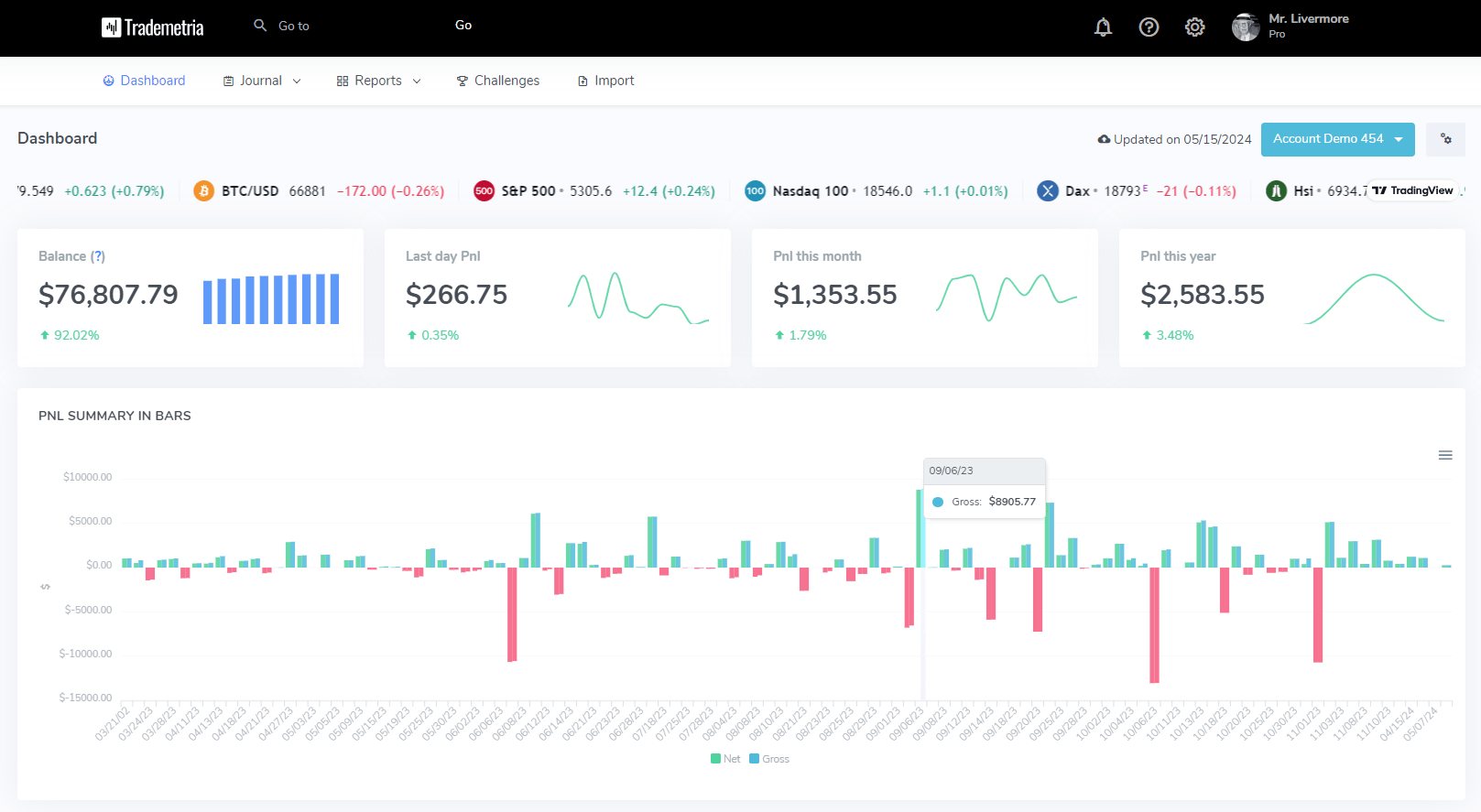
Trademetria's web interface is clean, modern, and reasonably intuitive. The dashboard presents a calendar view of your trading activity alongside key metrics, total P&L, win rate, average win, average loss, and profit factor. Navigation is straightforward, with clearly labeled sections for trades, reports, calendar, and settings.
The onboarding process is simple: create an account, connect your broker or upload a CSV, and you're looking at your first reports within minutes. There's no tutorial system or guided walkthrough, you're expected to explore the interface on your own. For experienced traders coming from spreadsheets, this is fine. For complete beginners who've never used a dedicated journal, the lack of onboarding guidance means a steeper initial learning curve than necessary.
The reporting interface provides the essentials: P&L by day, week, and month; performance by ticker; win rate breakdowns; and cumulative equity curves. Filtering lets you slice data by date range, asset class, and custom tags. The reports are functional but not as granular or visually polished as what you'll find in TradeZella (50+ reports with multi-dimensional filtering) or TraderSync (detailed dashboards with customizable layouts).
One area where Trademetria's UX shines is simplicity. There's less to learn and less to configure than in more feature-rich platforms. If you want a straightforward journal that doesn't overwhelm you with options, Trademetria's interface delivers. The flip side is that "simple" can start to feel "limited" once you want more sophisticated analysis, and there's no way to customize the dashboard layout or create custom report views.
Who Should Use Trademetria
Best For
Budget-conscious traders: If you're not ready to pay $29+/month for a journal, Trademetria is the only major platform with a functional free tier. The free plan supports 30 orders/month with basic analytics and mobile web access, enough for swing traders or beginners placing a handful of trades per week.
Mobile-first traders: If you want to log trades from your phone and check performance on the go, Trademetria's mobile-responsive web interface works on any device. However, for a true native app experience, TraderSync is the only major journal with dedicated iOS and Android apps (requires a paid subscription).
Trading educators and community managers: The white-label admin dashboards let you build a branded journaling experience for your students. If brand identity matters to your coaching business, this is a feature no other major journal offers.
Multi-asset traders: With support for stocks, options, futures, forex, crypto, and CFDs, Trademetria covers the widest range of asset classes. Traders who operate across multiple markets can consolidate everything in one journal.
Look Elsewhere If
You want backtesting: Trademetria has no backtesting engine. If testing strategies against historical market data is important to your workflow, TradeZella offers unlimited backtesting sessions with 11+ years of data, and Edgewonk provides backtesting functionality as well.
You want trade replay: There's no way to replay your trades in Trademetria. TradeZella offers 3 replay modes (step-by-step, speed control, and skip-to-action) on all plans, and TraderSync provides Market Replay with up to 250ms precision.
You need deep analytics: Trademetria's reporting covers the basics well but doesn't approach the depth of TradeZella's 50+ reports or TraderSync's customizable dashboards. If you want to analyze performance by time of day, setup type, market conditions, and dozens of other dimensions simultaneously, you'll outgrow Trademetria's analytics.
You want structured education: There's no built-in learning platform. TradeZella includes Zella University (courses, tutorials, and strategy templates) as part of its standard plans. Trademetria assumes you already know how to trade and just need a place to log your activity.
You're a professional or full-time trader: The gamification features, while fun for some, can feel out of place for serious traders focused purely on performance optimization. Professional traders typically need the analytical depth and customization that platforms like TradeZella and TraderSync provide.
How Trademetria Compares
Trademetria vs TradeZella
Trademetria wins on price (free plan vs $29/month). TradeZella wins on virtually everything else: 50+ analytical reports vs basic analytics, backtesting with 11+ years of data vs none, trade replay in 3 modes vs none, 25+ strategy templates vs none, Zella University education platform vs none, and 50+ analytics reports vs AI Coach on the most expensive plan only.
The value equation is stark at paid tiers. Trademetria's Premium plan at $29.95/month offers unlimited logging, analytics, and the PnL simulator. TradeZella's Basic plan at $29/month includes all of the above plus backtesting, replay, templates, education, and mentorship tools. For traders willing to invest in their development, TradeZella provides dramatically more functionality per dollar.
Trademetria makes sense as a starting point, a way to build the journaling habit for free before upgrading to a more comprehensive platform. But it's not a long-term substitute for traders who are serious about systematic improvement.
Trademetria vs TraderSync
These two are more directly comparable. Both offer AI features and standard analytics. Trademetria's advantages are the free plan, gamification, white-label tools, and broader asset class support (CFDs in addition to the usual suspects). TraderSync's advantages are more broker integrations (950+ vs 140+), more sophisticated AI coaching (Cypher AI with conversational interface), Market Replay with 250ms precision, and a more polished overall experience.
TraderSync's Elite plan ($79.95/month) is expensive but includes features that Trademetria simply doesn't offer at any price: MFE/MAE analysis, trade replay, and advanced risk metrics. For data-driven traders who want granular analysis, TraderSync goes deeper. For budget-conscious traders who want a free starting point and mobile access, Trademetria is the better entry.
Where Trademetria Fits in the Market
Trademetria occupies a specific niche: the accessible, budget-friendly journal for traders who aren't ready to invest in premium tools. It offers more than Tradervue (mobile web access, AI coaching, more modern interface) but less than TradeZella or TraderSync in analytical depth, AI sophistication, and advanced features.
Its sweet spot is the budget-conscious trader who wants a free or low-cost journal with mobile web access and basic AI coaching. Trading community managers may also find genuine value in the white-label admin dashboards, a feature unique to Trademetria.
For traders who want comprehensive tools for serious improvement, backtesting with 11+ years of data, trade replay, 25+ professional strategy templates, and structured education. TradeZella provides a more complete ecosystem at a comparable price point.
Frequently Asked Questions
Does Trademetria support crypto?
Yes, plus stocks, options, futures, forex, and CFDs. It supports the widest range of asset classes among major journals.
What are Trademetria's gamification features?
Trading challenges, achievements, and community competitions designed to keep traders engaged and accountable. Unique in the journal space but may not appeal to all trader profiles.
Can I use Trademetria for mentoring students?
Yes, through white-label admin dashboards that let you create branded monitoring for your trading community. It's a different approach from TradeZella's Spaces, which provides structured mentorship tools (trade-level feedback, full account access, unlimited students) within the platform.
Can I export my trade data from Trademetria?
Yes. Trademetria supports CSV export of your trade history, including execution data, tags, and notes. This makes it possible to migrate to another platform or run custom analysis in a spreadsheet. If you start on the free plan and later upgrade to a different journal, your data is portable.
Does Trademetria support multiple trading accounts?
Yes. You can connect multiple broker accounts within a single Trademetria login and filter analytics by account. This is useful for traders who use separate accounts for different strategies or asset classes, or who trade with both a personal account and a prop firm account. Account-level filtering is available on paid plans.
Does Trademetria have backtesting or trade replay?
No. Trademetria does not offer backtesting or trade replay. These are advanced features found in TradeZella (full backtesting with 11+ years of data, two trade replay modes) and TraderSync (trade replay and systematic backtesting). If testing strategies against historical data is part of your process, Trademetria cannot accommodate it.
Is Trademetria good for options trading?
Yes, and this is one of Trademetria's strongest differentiators. It is the only trading journal with explicit multi-leg options support, automatically grouping related legs (iron condors, spreads, butterflies) into a single position. If you trade complex options strategies, Trademetria handles the leg grouping that other journals require manual workarounds for.
How does Trademetria's AI Coach work?
The AI Coach is available on Trademetria's Pro plan ($29.95/month). It auto-generates journal entries based on your trade data and provides a chat-based assistant for asking questions about your trading patterns. It is more of a journaling assistant than a full AI trading partner. TradeZella's Zella AI goes much further with three autonomous agents (Session Review, Auto Trade Tagger, Market Sentiment Briefing) that work in the background, conversational AI for on-demand questions, and AI-powered pattern detection across 50+ reports.
Is Trademetria better than TradeZella?
Trademetria wins on price (free plan available, paid plans from $19.95/month) and multi-leg options support. TradeZella scores higher overall in our testing (TJ Score 9.4 vs 6.3) due to 50+ analytics reports, backtesting, trade replay, Zella University education, 500+ broker auto-sync, and stronger customer support. Choose Trademetria if you need multi-leg options tracking on a budget. Choose TradeZella for comprehensive analytics and trader development tools.
Does Trademetria have a mobile app?
No. Trademetria does not have native iOS or Android apps. The platform is web-based and accessible through mobile browsers, but there is no dedicated app. For mobile journaling, TraderSync is the only trading journal with native mobile apps for both iOS and Android.