
Quick Verdict
Tradervue is the lowest-ranked trading journal in our 2026 testing at 5.2/10, the only platform below 6.0 out of five we reviewed. As one of the earliest trading journals, it pioneered community-based trade sharing but has fallen behind every major competitor in features, AI, and active development. Its free plan (30 trades/month) remains a legitimate entry point, but a dated interface, 2.6/5 Trustpilot rating, and absence of backtesting, trade replay, or AI place it firmly behind the competition.
Best for: Budget traders who value community and mentorship over advanced features
Price range: Free to $49.95/month
Verdict: A serviceable free journal with good community features, but hard to recommend over more modern alternatives at paid tiers unless free is your only option.
| Quick Stats | |
|---|---|
| TJ Score | 5.2/10 |
| Trustpilot Rating | 2.6/5 |
| Starting Price | Free (30 trades/month) |
| Broker Integrations | 80+ |
| Mobile App | No |
| Assets Supported | Stocks, Options, Futures, Forex (no crypto) |
| Founded | Early 2010s |
TJ Score Breakdown: 5.2/10
Tradervue's TJ Score is the average of 8 independently evaluated categories, each scored 1–10. See our full methodology.
| Category | Score |
|---|---|
| Broker Support | 7.0 |
| Reporting & Analytics | 5.0 |
| Journaling Tools | 5.5 |
| Usability & Design | 6.0 |
| Advanced Features | 2.5 |
| Pricing & Value | 7.5 |
| Community & Trust | 4.0 |
| Support & Documentation | 4.0 |
| Overall TJ Score | 5.2/10 |
See our analysis of 1,201 Trustpilot reviews across 5 trading journals, including complaint categories, praise themes, and company response rates compared.
What Is Tradervue?
Tradervue is a web-based trading journal created by Greg Reinacker, the former founder and CTO of NewsGator. After building the tool for his own use, he released it publicly and it became one of the first dedicated trading journal platforms on the market.
The platform has an established user base and takes a community-first approach, emphasizing peer mentorship, shared learning through message boards, and collaboration. It integrates with 80+ brokers and uses TradingView for automatic chart generation with entry/exit points.
At 15 years old, however, Tradervue shows its age. The interface feels dated, development has slowed, and it lacks the AI, replay, and backtesting features that define modern journals.
Historical Significance
To understand Tradervue, you need to understand the context in which it was built. In 2011, there was no established category for "trading journal software." Traders kept spreadsheets, scribbled in notebooks, or used cobbled-together setups involving screenshots pasted into Word documents. The idea of a dedicated web application that could import trades from a broker, generate charts automatically, and let you annotate your thought process was genuinely novel.
Greg Reinacker was not a first-time founder. Before Tradervue, he created NewsGator, one of the earliest RSS feed readers, which grew into a successful enterprise content platform. He brought real engineering credibility to the project. Tradervue launched with clean architecture, reliable uptime, and a data-import system that worked, qualities that were not guaranteed in early fintech tools.
For several years, Tradervue was effectively the default choice for traders who wanted a digital journal. It built a loyal user base, and the community features gave it a network effect that competitors struggled to match. Prop firms and trading groups adopted it as their journaling standard. Many of today's trading journal platforms, including TradeZella and TraderSync, were built with Tradervue as an explicit reference point for what a journal should do, and what it should do better.
That historical position matters because it explains both Tradervue's strengths (community, reliability, name recognition) and its weaknesses (a codebase and feature set that reflect 2011-era thinking about what traders need).
Key Features
Free Plan (30 Trades/Month)
Tradervue's free tier allows up to 30 trades per month with basic import from supported brokers. For casual swing traders or those evaluating the platform, this is a no-risk way to test. The free plan includes community access and basic charting.
This is Tradervue's strongest advantage, no other major trading journal offers a comparable free plan. Trademetria offers a free tier as well (30 orders/month), but Tradervue's community features on the free plan add more value.
Automatic Chart Generation & TradingView Integration
The platform's most practical feature: TradingView integration automatically generates price charts for each trade with your entry and exit points plotted. Charts display across multiple timeframes (1-minute to weekly), and you can add indicators, trend lines, and annotations.
This saves the tedious work of taking manual screenshots for every trade.
When you import a trade, Tradervue automatically pulls the corresponding price data from TradingView and generates an interactive chart. Your entry point appears as a green marker and your exit as a red marker, plotted directly on the candlestick chart at the exact price and time. If you scaled into or out of a position across multiple fills, each execution is marked individually, so you can see exactly where you added and where you trimmed.
The charting interface supports standard TradingView tools: you can overlay moving averages, VWAP, Bollinger Bands, RSI, MACD, and other common indicators. You can draw trend lines, horizontal support/resistance levels, and Fibonacci retracements directly on the chart. These annotations are saved with the trade, so when you revisit your journal weeks later, the full context of your analysis is preserved.
Timeframe switching is seamless. You can toggle between 1-minute, 5-minute, 15-minute, hourly, daily, and weekly views for the same trade. This is particularly useful for multi-timeframe analysis, you might review a day trade on the 5-minute chart while checking whether it aligned with a daily trend.
The charting is genuinely one of Tradervue's better features and remains competitive with modern platforms. The main limitation is that it is view-only in the context of your journal, you cannot use it for live trading, set alerts, or connect it to any execution workflow. It is strictly a post-trade review tool.
Reports & Analysis
Tradervue provides basic reports covering day of week performance, time of day analysis, trade duration, instrument performance, tag-based analysis, and win/loss breakdowns. The reports are clear and functional but limited in scope, roughly 6 to 8 report types.
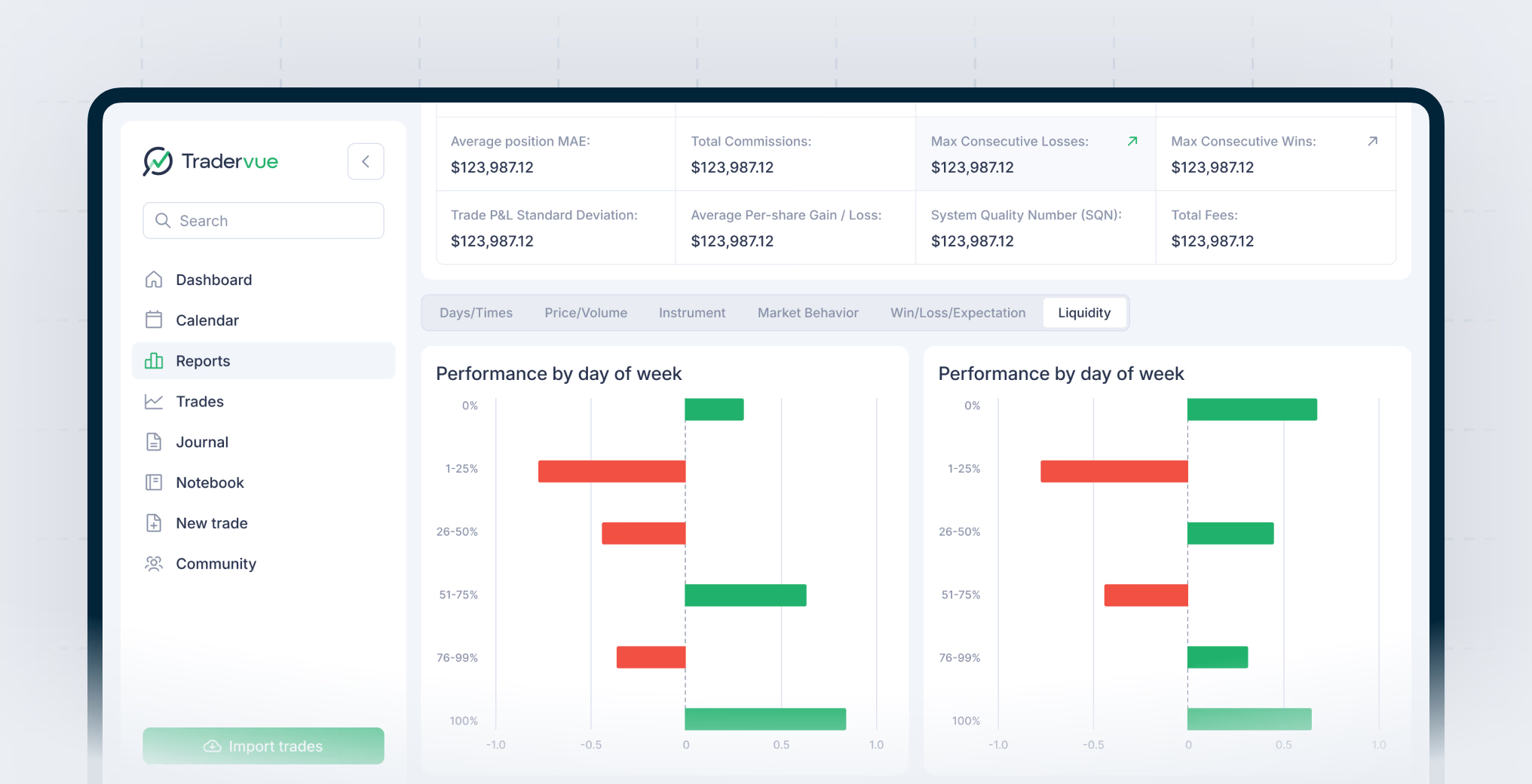
For comparison, platforms like TradeZella (with 500+ broker integrations) offer 50+ pre-built analytics reports with custom tag reports, compare tools, and options expiration analysis. Tradervue's analytics feel like a snapshot from a previous generation of journal software.
Community & Sharing
This is where Tradervue's legacy shines. The platform has an active community of traders who share trades publicly, discuss setups on message boards, and offer peer mentorship. You can publish trades to the community, share privately with specific people, or give a mentor read access to your journal.
For traders who learn through peer interaction and community discussion, Tradervue's sharing model has genuine value.
The community system works on several levels. At the most basic, you can mark any trade as "shared" and it becomes visible on Tradervue's public feed. Other traders can view your entry/exit chart, read your notes, and leave comments. This creates a lightweight social network built around actual trade data rather than opinions or screenshots, you are sharing verified executions, not curated highlights.
Beyond public sharing, Tradervue supports private sharing links. You can send a specific trade or your full journal to another trader, a mentor, or a trading group without making it visible to everyone. This is particularly useful in prop firm environments where a risk manager or coach needs to review a trader's performance without accessing the full platform.
The message boards are Tradervue's original social feature and still see regular activity. Traders post setups, discuss market conditions, and share lessons from their journal data. The tone tends to be more measured than what you would find on Twitter/X or Discord trading channels, partly because the audience skews toward experienced traders who have been on the platform for years.
Mentorship access is another notable feature. You can grant read-only access to your entire journal to a mentor or coach. They can browse your trades, view your charts, and see your notes and tags without being able to modify anything. For paid coaching relationships, this removes the friction of manually sending screenshots or spreadsheets after each session.
The limitation is that Tradervue's community features have not evolved much since they were introduced. There are no group journals, no structured coaching workflows, no video annotations, and no way to create curated collections of trades for educational purposes. Modern platforms like TradeZella's Spaces feature offer more structured mentorship tools with dedicated mentor-student workflows. But for organic, peer-to-peer learning, Tradervue's community still has a pulse.
Commission Tracking
Available on paid tiers, commission tracking automatically calculates the impact of commissions and fees on your P&L, a practical feature for active traders who need to understand their true net performance.
Pricing
Tradervue uses a three-tier pricing model. There are no annual discounts, you pay monthly regardless. Here is what each plan includes and where each falls short.
Free to $0/month
The free plan caps you at 30 trades per month. You get basic manual import (uploading broker execution files), community access, and TradingView chart generation for your trades. You can share trades publicly and participate in message boards. Basic charting annotations are included.
What you do not get: automatic broker syncing, detailed reports, risk analysis, commission tracking, or the ability to filter and segment your trade data in meaningful ways. The 30-trade limit makes it impractical for active day traders, if you take 5 trades per day, you burn through your monthly allocation in a week.
That said, for swing traders who take a handful of positions per month, or for anyone who simply wants to test whether journaling works for them, the free plan is a legitimate starting point. No credit card required, no time limit, no artificial restrictions beyond the trade count.
Silver: $29.95/month
Silver removes the trade limit and unlocks Tradervue's full reporting suite. You get unlimited trade imports, detailed performance reports (P&L by day of week, time of day, trade duration, instrument, and custom tags), trade sharing and privacy controls, and the ability to add notes and tags to each trade.
Silver also enables more granular filtering, you can segment trades by setup type, ticker, date range, and other criteria to isolate patterns in your data. This is where Tradervue starts functioning as an actual analytical tool rather than a simple log book.
The problem is the price. At $29.95/month ($359.40/year), you are paying nearly the same as TradeZella Basic ($29/month) which includes AI-powered analytics, 50+ report types, backtesting with 11+ years of historical data, trade replay, 25+ strategy templates, Zella University education content, and Spaces mentor tools. The feature gap at identical price points is enormous and difficult to overlook.
Gold: $49.95/month
Gold is Tradervue's premium tier, adding automatic broker import (your trades sync without manual file uploads), risk analysis tools, commission tracking, and everything in Silver. The automatic import is arguably the most impactful feature gated behind this tier, manual file upload is tedious enough that many traders stop journaling rather than maintain the habit.
Risk analysis on the Gold plan includes metrics like maximum adverse excursion (MAE), maximum favorable excursion (MFE), and basic position sizing analysis. Commission tracking automatically factors fees into your P&L calculations, giving you a more accurate picture of net performance.
At $49.95/month ($599.40/year), Gold costs significantly more than most competing platforms. TradeZella's Basic plan at $29/month includes automatic broker import as a standard feature, and TraderSync's Premium at $29.95/month also includes auto-sync. You are paying a 67% premium over TradeZella for a fraction of the feature set. The only justification is if you are deeply embedded in Tradervue's community and do not want to migrate your historical data.
| Feature | Free | Silver ($29.95/mo) | Gold ($49.95/mo) |
|---|---|---|---|
| Trades per month | 30 | Unlimited | Unlimited |
| Manual import | Yes | Yes | Yes |
| Automatic broker sync | No | No | Yes |
| TradingView charts | Yes | Yes | Yes |
| Community access | Yes | Yes | Yes |
| Full reports & analytics | No | Yes | Yes |
| Trade tagging & notes | Basic | Full | Full |
| Commission tracking | No | No | Yes |
| Risk analysis (MAE/MFE) | No | No | Yes |
| Trade sharing controls | Public only | Public + Private | Public + Private |
Pros and Cons
Pros:
- Free plan with 30 trades/month, genuine zero-cost option
- Established community with active traders
- TradingView chart generation for each trade
- Simple, straightforward interface
- Peer mentorship and trade sharing
Cons:
- 2.6/5 Trustpilot rating, lowest among major journals
- Dated interface that hasn't kept pace with modern design
- No AI features, no pattern recognition
- No backtesting
- No trade replay
- No strategy templates
- No education platform
- Only 80+ broker integrations (vs 500+ for TradeZella, 950+ for TraderSync)
- No mobile app
- No crypto support
- Slow development pace
- Paid tiers are overpriced for features offered
Import & Export: How Broker Integrations Work
Tradervue supports 80+ broker integrations, but that number requires context. The vast majority of these integrations are manual file imports, not automatic syncing. Here is how the process actually works.
Manual Import (All Plans)
For most brokers, you log into your brokerage account, navigate to your trade history or executions page, and export a CSV or text file. You then upload that file to Tradervue, which parses the data and creates trade entries. Supported brokers include major US platforms like TD Ameritrade (now Schwab), Interactive Brokers, E*TRADE, Fidelity, Webull, and Tastytrade, along with futures-focused platforms like NinjaTrader, Sierra Chart, and AMP Futures.
The import process is generally reliable. Tradervue has had over a decade to refine its parsers for each broker's file format. However, the experience varies by broker. Some platforms export clean files that import flawlessly. Others require manual cleanup, particularly when dealing with complex options trades or partial fills across multiple accounts.
The friction is real. If you are a day trader who takes 10-20 trades daily, the process of logging into your broker, exporting a file, navigating to Tradervue, uploading the file, and verifying the imports becomes a daily chore. This is the single biggest reason traders abandon manual journals, the habit breaks when the process is inconvenient.
Automatic Import (Gold Plan Only)
Tradervue's Gold plan ($49.95/month) enables automatic broker syncing for a subset of its supported brokers. With auto-import, trades flow into Tradervue without manual file uploads. The platform connects to your broker via API or through an intermediary data feed and pulls executions on a near-real-time basis.
The limitation is that automatic import is not available for all 80+ supported brokers. The auto-sync list is significantly shorter, covering major platforms like Interactive Brokers and a few others, but leaving out many brokers that only support manual file upload. If your broker is not on the auto-import list, you are paying Gold pricing for a feature you cannot use.
This is a meaningful competitive disadvantage. TradeZella offers automatic syncing across 500+ brokers on its Basic plan. TraderSync provides auto-import for many of its 950+ supported brokers. Tradervue gates its most convenient import method behind its most expensive tier, and even then, the coverage is limited.
Export & Migration
Tradervue allows you to export your trade data as CSV files. This includes execution data, tags, and notes. The export is reasonably comprehensive and can be used to migrate to another platform. If you have years of history in Tradervue and want to switch to TradeZella or TraderSync, the CSV export gives you a path forward, though you will lose some platform-specific formatting and any community interactions tied to shared trades.
User Experience: What It Feels Like Day-to-Day
Using Tradervue daily reveals both its straightforward design philosophy and the cost of minimal updates over 15 years.
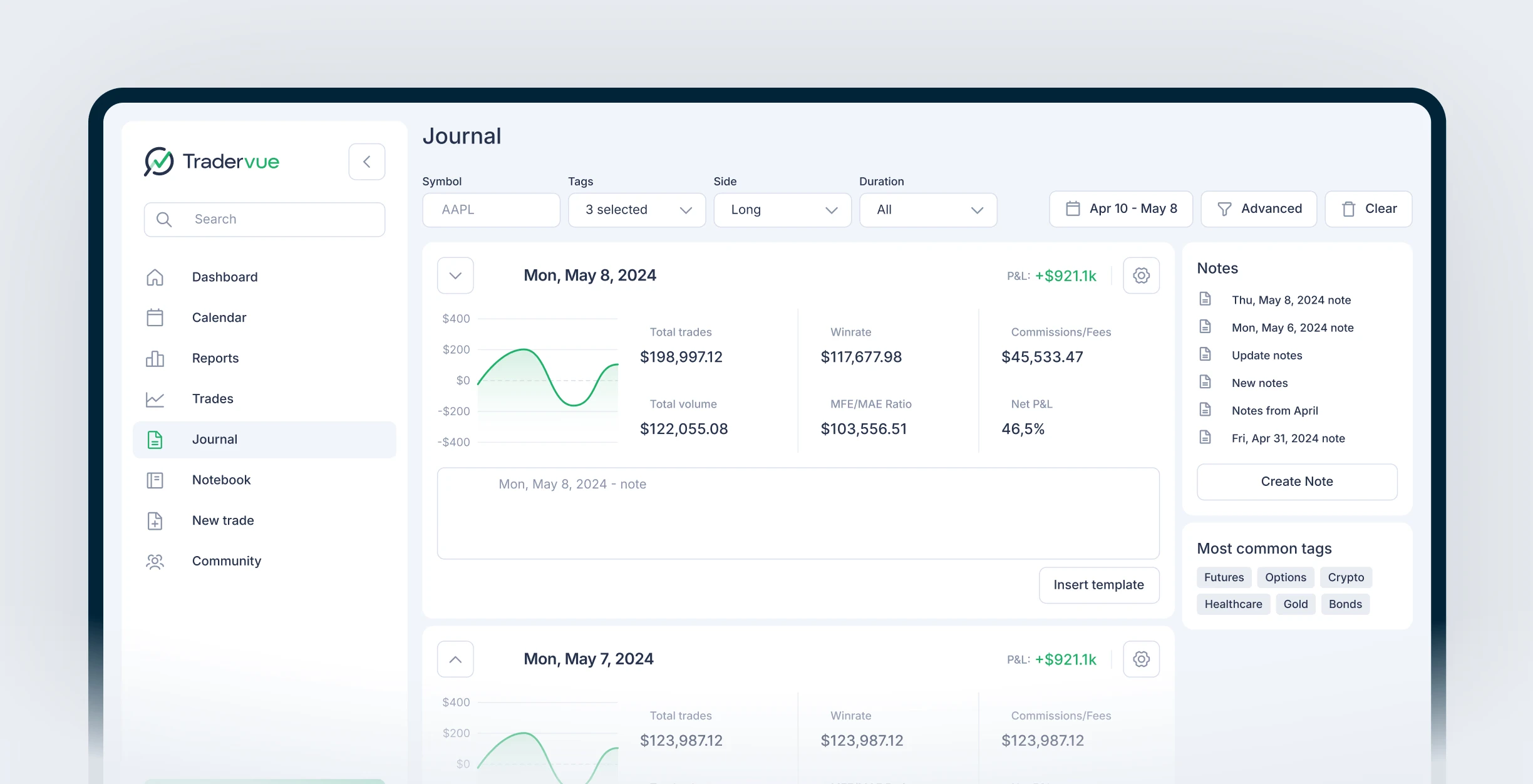
The interface is clean in the way that early 2010s web applications were clean, functional, uncluttered, but noticeably behind modern design standards. The dashboard shows a calendar view of your trading days, with each day color-coded green (profitable) or red (loss). Clicking a day opens your trade list for that date. Clicking a trade opens the chart with your entries and exits plotted.
Navigation is simple. The main tabs are Trades, Journal, Reports, and Community. There is no onboarding wizard, no tutorial overlay, no guided setup. You sign up, you figure out how to import trades, and you start logging. For experienced traders who prefer minimal hand-holding, this is fine. For beginners, the lack of guidance means a steeper initial learning curve, not because the interface is complex, but because it does not teach you how to use journaling effectively.
The journal view lets you add freeform notes to each trading day. This is separate from trade-level notes, you can write daily reflections about your emotional state, market conditions, or overall strategy adherence. It is a simple text editor with basic formatting. No templates, no prompts, no structured fields. You write what you want, or you write nothing.
The tag system is one of Tradervue's more useful features. You can create custom tags (like "VWAP bounce," "earnings play," "revenge trade," or "followed plan") and assign them to trades. Over time, these tags become powerful analytical tools, you can filter your reports by tag to see which setups are profitable and which are costing you money. The tagging system works well, but it requires discipline to use consistently.
Page load times are generally fast. The platform feels lightweight because it is, there are no complex dashboards, no real-time data feeds, no animations or visual effects. Everything renders quickly because there is not much to render. This is a genuine advantage for traders who just want to log trades and review data without waiting for heavy interfaces to load.
The biggest day-to-day frustration, based on user feedback, is the lack of mobile access. Tradervue is a desktop web application with no native mobile app and limited mobile browser optimization. If you want to review trades on your phone during a commute or add notes from a coffee shop, the experience is suboptimal. TraderSync offers full-featured native apps for iOS and Android, while TradeZella and Trademetria provide responsive web platforms that work on mobile browsers. Tradervue offers neither option.
What's Missing: A Detailed Look
Tradervue's feature gaps are not minor omissions, they represent entire categories of functionality that define modern trading journals. Here is a specific breakdown of what Tradervue does not offer.
No AI or Machine Learning
Tradervue has zero AI capabilities. There is no pattern recognition that identifies recurring setups in your trade data. There is no automated journaling that summarizes your trading day. There is no AI-powered insight engine that flags when you are deviating from your strategy or when your win rate on a specific setup is declining. Platforms like TradeZella have invested heavily in AI analytics that surface insights traders might miss manually. Tradervue requires you to do all of that analysis yourself.
No Trade Replay
Trade replay lets you re-watch your trades as they unfolded in real time, with price action playing back tick-by-tick or candle-by-candle. It is one of the most effective learning tools available because it forces you to re-experience the decision points without the benefit of hindsight. TradeZella and TraderSync both offer trade replay. Tradervue does not. You get a static chart with markers, useful, but fundamentally different from an interactive replay experience.
No Backtesting
Backtesting allows you to test a trading strategy against historical data before risking real capital. TradeZella offers backtesting with 11+ years of historical data. Tradervue has no backtesting capability at all. If you want to validate a new setup or check whether a strategy would have worked over the past year, you need to use a separate tool.
No Strategy Templates
Modern journals provide pre-built strategy templates that help traders define their rules, entry criteria, exit criteria, and risk parameters before entering a trade. TradeZella offers 25+ templates covering common setups. Tradervue has no template system, you build your own process from scratch using tags and notes.
No Mobile App
Tradervue has no native iOS or Android app. The web interface is not optimized for mobile browsers. TraderSync offers dedicated iOS and Android apps, while TradeZella and Trademetria provide responsive web platforms accessible on mobile browsers. Tradervue offers none of these options. Mobile journaling is not a luxury feature, it is how many traders add notes in real time while setups are fresh in their minds.
No Crypto Support
Tradervue supports stocks, options, futures, and forex. Cryptocurrency is not supported. For traders who split their activity between traditional markets and crypto, this means maintaining two separate journals or choosing a platform that covers both. TradeZella and TraderSync both support crypto trading alongside traditional asset classes.
No Education Platform
There is no built-in education content, no course library, no video tutorials on how to improve your trading through journaling. TradeZella's Zella University provides structured learning content. Tradervue assumes you already know what you are doing and provides tools accordingly. For experienced traders, that is fine. For developing traders who need guidance, it is a missed opportunity.
Who Should Use Tradervue
Despite its limitations, Tradervue is not a bad product for everyone. The question is whether it is the right product for your specific situation.
Tradervue Is a Good Fit If...
- You want a free journal and will not pay for any tool. Tradervue's free plan is the best zero-cost option in the market. Thirty trades per month with community access and TradingView charts is a legitimate offering for swing traders or part-time traders who do not need advanced analytics.
- You value community-based learning. If you learn best through peer interaction, viewing other traders' setups, participating in message boards, sharing your own trades for feedback. Tradervue's community features offer something that most competing platforms do not match.
- You already have years of data in Tradervue. Migration is always painful. If you have a multi-year journal in Tradervue with thousands of tagged and annotated trades, the switching cost is real. The historical data and institutional knowledge embedded in your journal may justify staying, even if newer platforms offer more features.
- You trade infrequently and just need a simple log. If you take a handful of trades per month and want a no-frills record with charts, Tradervue's simplicity is a feature, not a bug. Not every trader needs 50+ report types or AI insights.
Look Elsewhere If...
- You want AI-powered analytics or pattern recognition. Tradervue has none. Full stop.
- You need trade replay or backtesting. These are not available on any Tradervue plan.
- You trade crypto. Not supported.
- You want a mobile app. Does not exist.
- You are an active day trader willing to pay for a journal. At $29.95-$49.95/month, modern competitors offer dramatically more value. TradeZella at $29/month includes features that Tradervue does not offer at any price.
- You want structured mentorship tools. While Tradervue allows sharing, it lacks the dedicated coaching workflows that platforms like TradeZella's Spaces provide.
The Competitive Landscape in 2026
Tradervue pioneered the trading journal category in 2011 and deserves credit for that. But the market has moved significantly forward, and the competitive landscape in 2026 looks very different from even three years ago.
TradeZella has emerged as the most feature-rich platform in the category, with 500+ broker integrations, AI-powered analytics, trade replay, backtesting with 11+ years of data, 25+ strategy templates, Zella University education content, and Spaces for structured mentorship. At $29/month for the Basic plan, it offers more at a lower price point than Tradervue's Silver or Gold tiers. TradeZella holds a 4.8/5 Trustpilot rating, the highest in the category.
TraderSync leads in broker coverage with 950+ integrations and offers AI-powered trade analysis, a clean mobile app, and strong reporting. Its pricing starts at $29.95/month for the Premium plan, which includes auto-import and features that Tradervue reserves for its Gold tier. TraderSync carries a 4.7/5 Trustpilot rating.
Edgewonk takes a different approach, focusing on trading psychology and behavioral analytics. At $197/year (annual plan), it costs less than any of Tradervue's paid plans on an annualized basis while offering emotional tracking, tilt detection, and psychological pattern analysis. Edgewonk also holds a 4.7/5 Trustpilot rating.
Trademetria offers a free tier that competes directly with Tradervue's, 30 orders per month at no cost. Unlike Tradervue, Trademetria has a more modern, responsive web interface that works well on mobile browsers, though its community features are less developed. At paid tiers, Trademetria is significantly cheaper while offering comparable core functionality.
The pattern across all these comparisons is consistent: Tradervue's free plan remains competitive, but the moment you move to paid tiers, the value equation tilts heavily toward newer platforms. The journal market has matured rapidly, and Tradervue's development pace has not kept up.
For a detailed side-by-side analysis, see our TradeZella vs Tradervue comparison and our Best Trading Journals in 2026 guide.
Frequently Asked Questions
Does Tradervue support crypto?
No. Tradervue supports stocks, options, futures, and forex only.
Why does Tradervue have a low Trustpilot rating?
Tradervue has only 9 Trustpilot reviews, 8 of which are 1-star (89%). In our analysis of all Trustpilot reviews, 88% of Tradervue's negative reviews cite billing or cancellation issues, users report being charged after cancelling, inability to remove payment information, and unauthorized charges continuing for months or years. No negative review received a company response.
Does Tradervue have AI features?
No. Tradervue has no AI-powered analysis, no pattern recognition, and no automated insights.
How does Tradervue's tag system work?
You create custom tags (like "VWAP bounce," "earnings play," or "revenge trade") and assign them to individual trades. Over time, you can filter your reports by tag to see which setups are profitable and which are costing you money. Tags are available on all plans but become most useful on Silver and Gold where full reporting is unlocked. The system is flexible but requires manual discipline. Tradervue does not auto-tag trades for you.
Can I export my trade history from Tradervue?
Yes. Tradervue supports CSV export of your trade data, including execution details, tags, and notes. This is useful for custom spreadsheet analysis or migrating to another platform. If you have years of history in Tradervue, the export gives you a portable copy of your data, though platform-specific formatting and community interactions tied to shared trades will not transfer.
Does Tradervue have AI features?
No. Tradervue has no AI-powered analytics, pattern recognition, or automated analysis. The platform relies on manual analysis and traditional reporting. For AI features, TradeZella offers Zella AI (50+ AI-powered reports), TraderSync offers Cypher AI (conversational coaching), and Edgewonk offers Edge Finder (statistical edge identification).
Does Tradervue have backtesting or trade replay?
No. Tradervue offers neither backtesting nor trade replay. These are features found in newer platforms: TradeZella provides both (11+ years of historical backtesting data and two replay modes), and TraderSync offers trade replay and systematic backtesting. If strategy testing or visual trade review matters to your process, Tradervue cannot accommodate it.
Is Tradervue still worth using in 2026?
The free plan remains useful for casual traders who want basic trade logging at no cost, and the community sharing feature is still unique. At paid tiers ($29.95 to $49.95/month), Tradervue is difficult to recommend when competitors offer dramatically more features. TradeZella provides 50+ reports, backtesting, trade replay, and education at comparable or lower pricing. Tradervue's TJ Score of 5.2 reflects a platform that has not evolved to match modern alternatives.
Why does Tradervue have a low Trustpilot rating?
Tradervue's 2.6/5 Trustpilot rating (from 9 reviews) reflects user frustration with slow development, an outdated interface, and a feature set that has not kept pace with modern competitors. Common complaints include the lack of AI features, no trade replay, no backtesting, and limited broker coverage (80+). The small review count means the rating may not fully represent all users, but the trend aligns with our testing findings.
Is Tradervue better than TradeZella?
Tradervue has two advantages: a free plan (30 trades/month) and a built-in community with public trade sharing. In every other category, TradeZella outperforms it (TJ Score 9.4 vs 5.2): 50+ analytics reports vs basic reporting, 500+ broker integrations vs 80+, backtesting and trade replay vs neither, AI-powered insights vs none, and Zella University education vs no learning tools. Unless free access or community sharing is your top priority, TradeZella delivers significantly more value.